NeuroKit Logo
latest
  • Introduction
    • Quick Example
    • Installation
    • Contributing
    • Documentation
      • General
      • Examples
    • Citation
    • Physiological Data Preprocessing
      • Simulate physiological signals
      • Electrodermal Activity (EDA/GSR)
      • Cardiac activity (ECG)
      • Respiration (RSP)
      • Electromyography (EMG)
      • Photoplethysmography (PPG/BVP)
      • Electrooculography (EOG)
      • Electrogastrography (EGG)
    • Physiological Data Analysis
      • Event-related
      • Interval-related
    • Miscellaneous
      • Heart Rate Variability (HRV)
      • ECG Delineation
      • Signal Processing
      • Complexity (Entropy, Fractal Dimensions, …)
      • Signal Decomposition
      • Signal Power Spectrum Density (PSD)
      • Statistics
    • Popularity
    • Notes
  • Authors
    • Core team
    • Contributors
  • Installation
    • 1. Python
      • Windows
        • Winpython
        • Miniconda or Anaconda
      • Mac OS
    • 2. NeuroKit
  • Get Started
    • Get familiar with Python in 10 minutes
      • Setup
      • Variables
      • Variables and data types
      • Lists and dictionnaries
      • Basic indexing
      • Indexing starts from 0
      • Control flow (if and else)
      • For loops
      • Functions
      • Packages
      • Lists vs. vectors (arrays)
      • Conditional indexing
      • Dataframes
      • Reading data
      • Next steps
    • Where to start
  • Examples
    • Try the examples in your browser
    • 1. Analysis Paradigm
      • a) Event-related paradigm
      • b) Interval-related paradigm
    • 2. Biosignal Processing
      • a) Custom processing pipeline
    • 3. Heart rate and heart cycles
      • a) Detecting components of the cardiac cycle
      • b) Looking closer at heart beats
    • 4. Electrodermal activity
      • a) Extracting information in EDA
    • 5. Respiration rate and respiration cycles
      • a) Extracting Respiration Rate Variability metrics
    • 6. Muscle activity
    • Simulate Artificial Physiological Signals
      • Cardiac Activity (ECG)
      • Respiration (RSP)
      • Electromyography (EMG)
      • Electrodermal Activity (EDA)
    • Customize your Processing Pipeline
      • The Default NeuroKit processing pipeline
      • Building your own process() function
      • Changing the processing parameters
      • Customize even more!
    • Event-related Analysis
      • The Dataset
      • Find Events
      • Process the Signals
      • Create Epochs
      • Extract Event Related Features
      • Plot Event Related Features
      • Important remarks:
    • Interval-related Analysis
      • The Dataset
      • Process the Signals
      • Extract Features
      • Optional: Segmenting the Data
    • Analyze Electrodermal Activity (EDA)
      • Extract the cleaned EDA signal
      • Locate Skin Conductance Response (SCR) features
      • Decompose EDA into Phasic and Tonic components
      • Quick Plot
    • Analyze Respiratory Rate Variability (RRV)
      • Download Data and Extract Relevant Signals
      • Analyse RRV
        • See documentation for full reference
    • ECG-Derived Respiration (EDR) Analysis
      • Download ECG Data
      • Extraction of ECG Features
      • Analyse EDR
    • Extract and Visualize Individual Heartbeats
      • Extract the cleaned ECG signal
      • Extract R-peaks location
      • Segment the signal around the heart beats
      • Advanced Plotting
        • Custom colors and legend
        • Interactivity
    • How to create epochs
      • One signal with multiple event markings
      • One subject with multiple data files
    • Complexity Analysis of Physiological Signals
      • Basic Concepts
        • Definitions
        • Time-delay embedding
        • Embedding Parameters
      • Entropy as measures of Complexity
        • Shannon Entropy (ShEn)
        • Approximate Entropy (ApEn)
        • Sample Entropy (SampEn)
        • Fuzzy Entropy (FuzzyEn)
        • Multiscale Entropy (MSE)
      • Detrended Fluctuation Analysis (DFA)
    • Analyze Electrooculography EOG data (eye blinks, saccades, etc.)
      • Explore the EOG signal
      • Clean the signal
      • Detect and visualize eye blinks
    • Fit a function to a signal
      • Fit a linear function
      • Non-linear curves
  • Resources
    • Recording good quality signals
      • Recording
      • Signal quality
      • Artifacts and Anomalies
    • What software for physiological signal processing
      • Software vs. programming language (packages)
      • GUI vs. code
      • Matlab vs. Python vs. R vs. Julia
    • Additional Resources
      • General Neuroimaging
      • ECG
      • EDA
      • EEG
  • Functions
    • ECG
    • PPG
    • HRV
    • RSP
    • EDA
    • EMG
    • EEG
    • Signal Processing
    • Events
    • Data
    • Epochs
    • Statistics
    • Complexity
    • Miscellaneous
  • Benchmarks
    • Benchmarking of ECG Preprocessing Methods
      • Introduction
      • Databases
        • Glasgow University Database
        • MIT-BIH Arrhythmia Database
        • MIT-BIH Normal Sinus Rhythm Database
        • Concanate them together
      • Study 1: Comparing Different R-Peaks Detection Algorithms
        • Procedure
        • Results
        • Conclusion
      • Study 2: Normalization
        • Procedure
        • Results
        • Conclusion
    • References
  • Datasets
    • ECG (1000 hz)
    • ECG - pandas (3000 hz)
    • Event-related (4 events)
    • Resting state (5 min)
    • Resting state (8 min)
  • Contributing
    • Understanding NeuroKit
      • 1. readthedocs
        • Example
      • 2. The code on Github
        • Example
      • 3. The code on YOUR machine
        • Python directory
        • Windows
        • Mac
        • Example
    • Contributing guide
      • NeuroKit’s style
        • Structure and code
        • Run code checks
        • Avoid Semantic Errors
        • Development workflow
      • How to use GitHub to contribute
        • Step 1: Fork it
        • Step 2: Clone it
        • Step 3: Find it and fix it
        • Step 4: Commit it and push it
        • Step 4: Create pull request
        • Step 5: Let’s do it
      • Useful reads
      • What’s next?
    • Ideas for first contributions
      • Look for “good first contribution” issues
      • Improving documentation
      • Adding tests
      • Adding examples and tutorials
        • How to write
        • Where to add the files
NeuroKit
  • Docs »
  • Examples »
  • Interval-related Analysis
  • Edit on GitHub

Interval-related Analysis

This example shows how to use Neurokit to analyze longer periods of data (i.e., greater than 10 seconds) such as resting state data. If you are looking to perform event-related analysis on epochs, you can refer to this Neurokit example here.

[1]:
# Load NeuroKit and other useful packages
import neurokit2 as nk
import pandas as pd
import matplotlib.pyplot as plt
%matplotlib inline
[2]:
plt.rcParams['figure.figsize'] = [15, 9]  # Bigger images
plt.rcParams['font.size']= 13

The Dataset

First, download the dataset located on the GitHub repository.

It contains 5 minutes of physiological signals recorded at a frequency of 100Hz (5 x 60 x 100 = 30000 data points).

It contains the following signals : ECG, PPG, RSP

[3]:
# Get data
data = pd.read_csv("https://raw.githubusercontent.com/neuropsychology/NeuroKit/master/data/bio_resting_5min_100hz.csv")

This is the resting state data from 1 participant who was asked to close his/her eyes for 8 minutes, trying not to think of anything as well as not to fall asleep.

Process the Signals

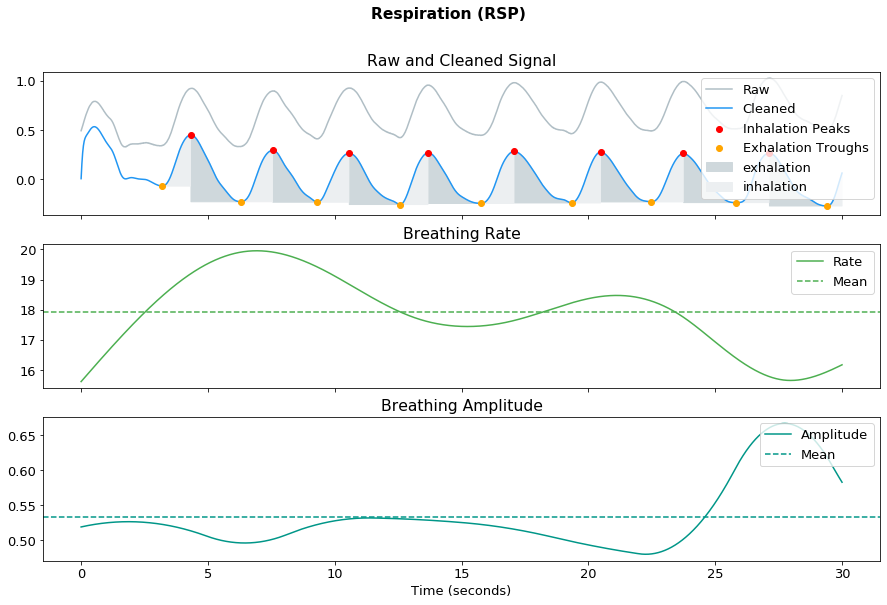
In this analysis here, we will focus on extracting ECG and RSP features. To process the respective physiological signals, you can use ecg_process() and rsp_process(). You can then then visualize these signals using ecg_plot() and rsp_plot(). For the purposes of these example, we will select just 3000 datapoints (or 30s) to visualize.

Note: Do remember to specify the correct sampling_rate (in this case, to 100Hz) in which the signals were generated, in all the relevant functions.

[4]:
# Process ecg
ecg_signals, info = nk.ecg_process(data["ECG"], sampling_rate=100)
plot = nk.ecg_plot(ecg_signals[:3000], sampling_rate=100)
../_images/examples_intervalrelated_10_0.png
[5]:
# Process rsp
rsp_signals, info = nk.rsp_process(data["RSP"], sampling_rate=100)
plot = nk.rsp_plot(rsp_signals[:3000], sampling_rate=100)
../_images/examples_intervalrelated_11_0.png

Extract Features

Now that we have the processed signals, we can now perform the analysis using ecg_intervalrelated() and rsp_intervalrelated(). Simply provide the processed dataframe and these functions will return a dataframe of the features pertaining to the specific signal.

These features will be quite different from event-related features (See Event-related analysis example) as these signals were generated over a longer period of time. Hence, apart from the mean signal rate, variability metrices pertaining to heart rate variability (HRV) and respiratory rate variability (RRV) are also extracted here.

[6]:
nk.ecg_intervalrelated(ecg_signals)
[6]:
ECG_Rate_Mean HRV_RMSSD HRV_MeanNN HRV_SDNN HRV_SDSD HRV_CVNN HRV_CVSD HRV_MedianNN HRV_MadNN HRV_MCVNN ... HRV_LFn HRV_HFn HRV_LnHF HRV_SD1 HRV_SD2 HRV_SD2SD1 HRV_CSI HRV_CVI HRV_CSI_Modified HRV_SampEn
0 86.394304 3.883777 69.475638 4.903604 3.888256 0.07058 0.055901 69.0 4.4478 0.064461 ... NaN 0.885628 1.137604 2.749412 4.762122 1.732051 1.732051 2.32116 32.992946 1.978637

1 rows × 30 columns

[7]:
nk.rsp_intervalrelated(rsp_signals)
[7]:
RSP_Rate_Mean RSP_Amplitude_Mean RRV_SDBB RRV_RMSSD RRV_SDSD RRV_VLF RRV_LF RRV_HF RRV_LFHF RRV_LFn RRV_HFn RRV_SD1 RRV_SD2 RRV_SD2SD1 RRV_ApEn RRV_SampEn RRV_DFA_2
0 15.744233 0.397941 100.662988 119.691326 120.504248 NaN NaN 793512.619536 NaN NaN NaN 85.209371 114.041384 1.338367 0.717675 1.504077 0.618535

Optional: Segmenting the Data

If you want to segment your data for analysis, such as analyzing two separate portions of your resting state data, you can simply do so by splitting the ecg_signals dataframe into epochs using epochs_create(). Using this example dataset, let’s say you want to analyze the first half and the second half of the ECG data. This means that each halved data would last for 60 x 2.5s = 150s.

In this function, we would also specify the onset of events to be at the 0th (for the first half of the data) and the 15000th datapoint (for the second half of the data), since there are 30000 data points in total.

[8]:
# Half the data
epochs = nk.epochs_create(ecg_signals, events=[0, 15000], sampling_rate=100, epochs_start=0, epochs_end=150)

This returns a dictionary of 2 processed ECG dataframes, which you can then enter into ecg_intervalrelated().

[9]:
# Analyze
nk.ecg_intervalrelated(epochs)
[9]:
ECG_Rate_Mean HRV_RMSSD HRV_MeanNN HRV_SDNN HRV_SDSD HRV_CVNN HRV_CVSD HRV_MedianNN HRV_MadNN HRV_MCVNN ... HRV_LFn HRV_HFn HRV_LnHF HRV_SD1 HRV_SD2 HRV_SD2SD1 HRV_CSI HRV_CVI HRV_CSI_Modified HRV_SampEn
1 86.377089 3.638450 69.497674 5.167181 3.645389 0.074350 0.052354 69.0 4.4478 0.064461 ... NaN NaN NaN 2.577680 4.464672 1.732051 1.732051 2.265138 30.932155 1.252763
2 86.411519 4.032578 69.460465 4.648090 4.042033 0.066917 0.058056 69.0 4.4478 0.064461 ... NaN NaN NaN 2.858149 4.950459 1.732051 1.732051 2.354850 34.297785 1.881786

2 rows × 30 columns

This then returns a dataframe of the analyzed features, with the rows representing the respective segmented signals. Try doing this with your own signals!

Next Previous

© Copyright 2020, Dominique Makowski Revision a90f157b.